Using Tesseract with Node.js
This is an older note on using Tesseract OCR with Node.js.
What interested me about Tesseract was that the API is actually pretty simple, but the quality of the result depends a lot on the input image.
What Tesseract Is
Tesseract is an OCR engine, meaning it tries to extract text from an image.
For a Node.js project, the basic idea is:
- install the OCR engine locally
- use a Node wrapper to call it
- pass it an image path
- get text back
Basic Setup
Tesseract depends on Leptonica, so that needs to be installed first.
brew install leptonica
brew install tesseract
If you need language support beyond English, you also need to install the appropriate language package.
For the Node side, I used:
npm install node-tesseract
Basic Usage
Most of the actual work happens on the backend.
The Node wrapper is simple to require:
var tesseract = require('node-tesseract');
Then you can process an image by passing in a file path and a callback:
tesseract.process(__dirname + '/path/to/image.jpg', function(err, text) {
  if (err) {
    console.error(err);
  } else {
    console.log(text);
  }
});
That part is not the hard part.
What Actually Matters
The part that mattered more in practice was the quality of the input image.
Two things made a big difference when I was experimenting with it:
- whether the text was handwritten
- whether the image had already been simplified into something high-contrast
If the text is handwritten, OCR gets much harder.
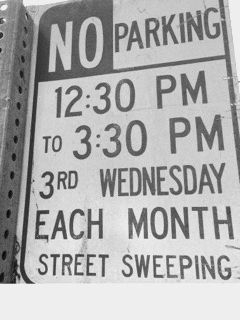
If the image is fully colored or noisy, converting it into something closer to black and white usually helps a lot.
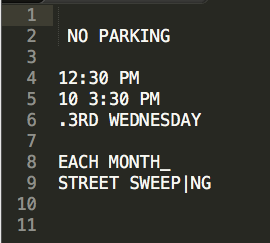
That was the biggest practical takeaway for me: OCR quality is not just about the engine. A lot of it comes down to preprocessing the image into a form the engine can actually read well.
Here is the result I got: